
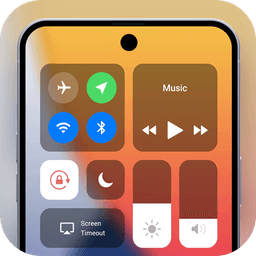
Screenshots
About Control Center OS
Control Center OS brings iOS-style quick access to your Android device, letting you instantly reach Camera, Clock, Flashlight, and essential settings from anywhere on your screen.
Access your control center with a simple gesture—swipe up, right, or left from the edge of your screen. Close it just as easily by swiping down, tapping the top, or pressing Back, Home, or Recent. No hunting through menus or nested settings. Everything you need is one gesture away.
Manage critical device settings in seconds. Toggle Airplane Mode to instantly disable Bluetooth, Wi-Fi, and cellular connections when you need offline time. Switch Wi-Fi on to browse, stream, or download without opening Settings. Connect to Bluetooth headphones, car kits, and wireless keyboards instantly. Activate Do Not Disturb to silence calls, alerts, and notifications while your device is locked. Lock your screen orientation so it stays portrait when you're lying down. Adjust brightness on the fly without interrupting what you're doing. Turn on your flashlight using your camera's LED—perfect for finding your keys or navigating in low light.
Control Center OS also puts everyday tools within reach. Set alarms, timers, and stopwatches with a single tap. Check the time across multiple time zones. Use the built-in Calculator for quick math without switching apps. Launch your Camera instantly so you never miss a shot. Control audio playback, pause music, manage volume, and access podcasts—all without leaving your current app or activity.
Personalize your control center to match your style and workflow. Adjust the size, color, and position of controls to fit your preferences. Enable or disable vibration feedback based on your needs. Reorganize which settings and apps appear in your quick-access panel, creating a personalized interface that fits your daily routine and usage patterns.
Control Center OS transforms how you interact with your Android device, eliminating the need to dive deep into Settings or swipe through multiple home screens. Download Control Center OS today and experience faster, smarter device control.
Pros & Cons
Pros
- Quick gesture access to settings and tools from anywhere on screen
- Customizable layout, colors, and position to match your preferences
- One-tap control of Wi-Fi, Bluetooth, Airplane Mode, and Do Not Disturb
- Built-in clock, calculator, timer, and instant camera launch
Cons
- Requires ongoing accessibility permissions to detect edge gestures
- May conflict with system gestures or third-party launcher customizations
- No mention of dark mode or adaptive theming options
- Adds another app to manage alongside native Android Quick Settings
Related Apps

HWiNFO
Hardware monitoring for Windows—track CPU temp, GPU load, fan speed, voltage in real time.

TransMac
Read Mac drives and DMG files on Windows. Access APFS/HFS+ storage and create disk images.

Advanced SystemCare Free
System optimization tool: clean, repair, and secure your PC. Remove malware, fix errors, and boost performance.

Display Driver Uninstaller (DDU)
Driver uninstaller for GPU and audio — removes residual files for clean Windows updates

Glary Utilities
PC maintenance and optimization suite — clean, repair, and speed up your Windows computer in one action.

Universal ADB Drivers
ADB drivers for Android: Connect any smartphone to Windows PC without manufacturer software.
Latest Articles

Melhores aplicativos para pequenos modelos de codificação local em desktop em 2026 (7 que superam os gigantes)
Jul 26, 2026
Melhores aplicativos para firewall crowdsourced de homelab no desktop em 2026 (7 que bloqueiam ataques desde o primeiro dia)
Jul 26, 2026

Melhores alternativas para Nekotina no desktop em 2026 (7 bots de anime Discord para servidores de RPG)
Jul 26, 2026

Melhores alternativas ao Mistral em 2026 (7 aplicativos de chat de IA que testamos contra o Vibe)
Jul 26, 2026
Melhores alternativas ao Hydra para Discord desktop em 2026 (7 bots de música que ainda funcionam)
Jul 26, 2026